Python(FastAPI)으로 통화 완료 웹훅 받아 SQLite에 저장하기
KAT Cloud의 CALL_COMPLETED 웹훅을 FastAPI로 받아 SQLite에 저장하는 방법입니다. 즉시 200 응답, BackgroundTasks 처리, callHistoryId 기준 upsert, STT 배열 저장과 조회 예시까지 단계별로 다룹니다.
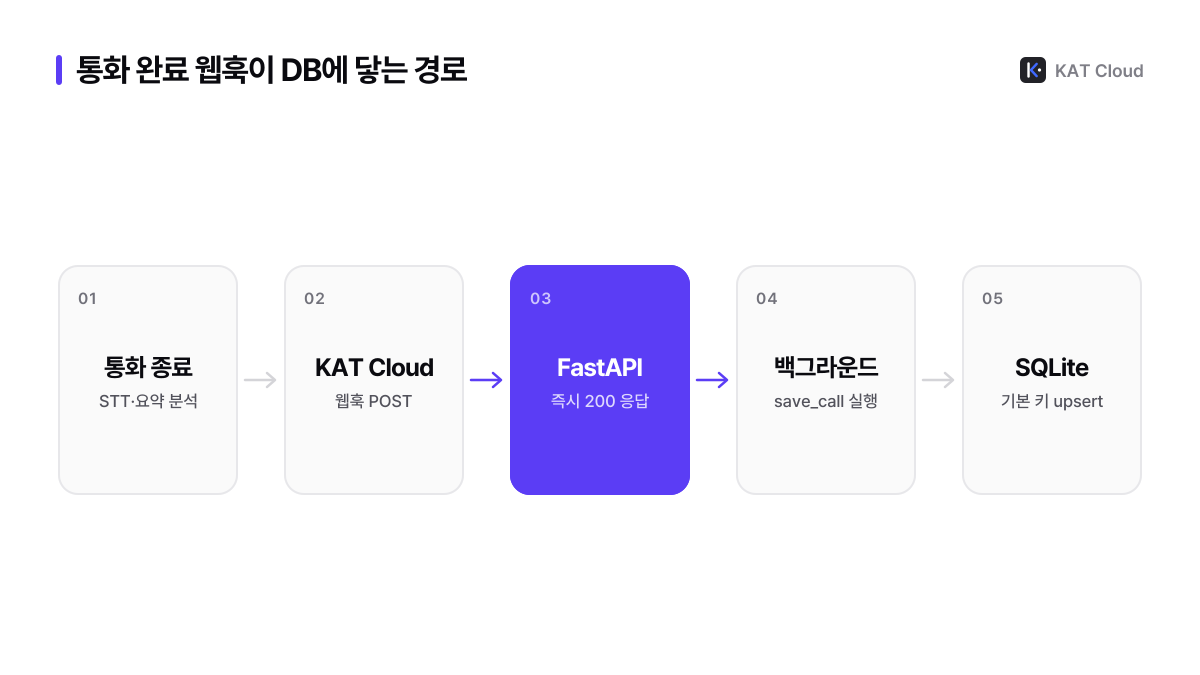
KAT Cloud의 CALL_COMPLETED 웹훅은 통화가 끝나고 STT·요약 분석이 완료되면 통화 기록 ID, 통화 상태, 응대 태그, 통화 시간, 요약, 대화 내역을 한 번에 보내 주는 이벤트입니다. Python에서는 FastAPI 엔드포인트 하나와 표준 라이브러리 sqlite3만으로 이 이벤트를 받아 저장할 수 있습니다. 이 글은 요청을 받으면 바로 200으로 응답하고, 저장은 BackgroundTasks로 넘기며, callHistoryId를 기본 키로 써서 같은 통화가 두 번 와도 한 행만 남기는 서버를 만듭니다.
CALL_COMPLETED 페이로드 살펴보기
KAT Cloud(캣클라우드)가 보내는 CALL_COMPLETED 요청 본문은 다음과 같습니다. 최상위에 eventType과 timestamp가 있고, 통화 정보는 data 안에 있습니다.
{
  "eventType": "CALL_COMPLETED",
  "timestamp": "2026-03-12T02:45:30.000Z",
  "data": {
    "callHistoryId": "8f3f8fd9-7ab8-4a26-b523-4f8eb7d38b85",
    "groupId": 1,
    "channelId": 100,
    "fromNumber": "01012345678",
    "toNumber": "07012345678",
    "isInbound": true,
    "status": "ANSWERED",
    "tag": "AI_TO_DIRECT",
    "duration": 96,
    "summary": "예약 변경 요청을 접수하고 변경 가능한 시간대를 안내함",
    "sttAI": [
      { "role": "agent", "text": "안녕하세요. KAT Cloud입니다.", "timestamp": 1.2 }
    ],
    "sttDirect": [
      { "role": "customer", "text": "직원 연결 부탁드립니다.", "timestamp": 30.1 }
    ],
    "recordingUrl": "https://storage.example.com/recording.wav",
    "startedAt": "2026-03-12T02:40:00.000Z",
    "completedAt": "2026-03-12T02:41:36.000Z"
  }
}
각 필드를 SQLite 컬럼으로 옮길 때의 기준은 다음과 같습니다.
| 필드 | 타입 | 저장 컬럼 | 메모 |
|---|---|---|---|
callHistoryId | string | call_history_id | 기본 키. 중복 저장을 막는 기준 |
fromNumber, toNumber | string | from_number, to_number | isInbound가 true면 fromNumber가 고객 |
isInbound | boolean | is_inbound | SQLite에는 0 또는 1로 저장 |
status | string | status | ANSWERED, MISSED, REJECTED, UNKNOWN |
tag | string | tag | AI, DIRECT, AI_TO_DIRECT, UNKNOWN |
duration | number | duration | 통화 시간(초) |
summary | string | summary | 통화 요약. 비어 있을 수 있음 |
sttAI, sttDirect | object[] | stt_ai, stt_direct | JSON 문자열로 저장 |
recordingUrl | string | recording_url | 선택 필드 |
startedAt, completedAt | string | started_at, completed_at | ISO 8601 |
sttAI는 AI가 응대한 구간, sttDirect는 직원이 응대한 구간의 대화이고 각 항목은 role, text, timestamp(초 단위, 소수점 포함)로 이뤄집니다. 통화 당시 녹음이 꺼져 있었다면 요약과 STT가 제공되지 않으므로 summary, stt_ai 같은 컬럼은 비어 있어도 되게 만듭니다. 대화 데이터 구조는 통화 받아쓰기와 요약 데이터 구조 글에서 더 자세히 설명합니다.
1단계: SQLite 테이블과 저장 함수 만들기
먼저 db.py에 테이블 정의와 저장 함수를 둡니다. 저장은 INSERT ... ON CONFLICT DO UPDATE(upsert)로 합니다. 같은 callHistoryId가 다시 오면 새 행을 만들지 않고 기존 행을 최신 값으로 덮어씁니다. 이 한 줄이 곧 중복 제거입니다.
# db.py
import json
import sqlite3
from contextlib import closing

DB_PATH = "calls.db"

SCHEMA = """
CREATE TABLE IF NOT EXISTS calls (
    call_history_id TEXT PRIMARY KEY,
    group_id        INTEGER,
    channel_id      INTEGER,
    from_number     TEXT,
    to_number       TEXT,
    is_inbound      INTEGER,
    status          TEXT,
    tag             TEXT,
    duration        INTEGER,
    summary         TEXT,
    stt_ai          TEXT,
    stt_direct      TEXT,
    recording_url   TEXT,
    started_at      TEXT,
    completed_at    TEXT,
    saved_at        TEXT DEFAULT (strftime('%Y-%m-%dT%H:%M:%fZ', 'now'))
);
CREATE INDEX IF NOT EXISTS idx_calls_started_at ON calls (started_at);
"""

UPSERT = """
INSERT INTO calls (
    call_history_id, group_id, channel_id, from_number, to_number, is_inbound,
    status, tag, duration, summary, stt_ai, stt_direct, recording_url,
    started_at, completed_at
) VALUES (
    :call_history_id, :group_id, :channel_id, :from_number, :to_number, :is_inbound,
    :status, :tag, :duration, :summary, :stt_ai, :stt_direct, :recording_url,
    :started_at, :completed_at
)
ON CONFLICT(call_history_id) DO UPDATE SET
    status = excluded.status,
    tag = excluded.tag,
    duration = excluded.duration,
    summary = excluded.summary,
    stt_ai = excluded.stt_ai,
    stt_direct = excluded.stt_direct,
    recording_url = excluded.recording_url,
    completed_at = excluded.completed_at
"""


def connect() -> sqlite3.Connection:
    conn = sqlite3.connect(DB_PATH, timeout=10)
    conn.execute("PRAGMA journal_mode=WAL")  # 읽기와 쓰기가 덜 막히게
    return conn


def init_db() -> None:
    with closing(connect()) as conn:
        conn.executescript(SCHEMA)


def save_call(data: dict) -> None:
    row = {
        "call_history_id": data["callHistoryId"],
        "group_id": data.get("groupId"),
        "channel_id": data.get("channelId"),
        "from_number": data.get("fromNumber"),
        "to_number": data.get("toNumber"),
        "is_inbound": 1 if data.get("isInbound") else 0,
        "status": data.get("status"),
        "tag": data.get("tag"),
        "duration": data.get("duration"),
        "summary": data.get("summary"),
        "stt_ai": json.dumps(data.get("sttAI") or [], ensure_ascii=False),
        "stt_direct": json.dumps(data.get("sttDirect") or [], ensure_ascii=False),
        "recording_url": data.get("recordingUrl"),
        "started_at": data.get("startedAt"),
        "completed_at": data.get("completedAt"),
    }
    with closing(connect()) as conn, conn:  # 두 번째 conn이 커밋·롤백을 맡는다
conn.execute(UPSERT, row)ensure_ascii=False를 주면 한국어 대화가 \uXXXX로 바뀌지 않고 그대로 저장되어 DB를 직접 열어 봐도 읽을 수 있습니다.
2단계: FastAPI 엔드포인트 작성
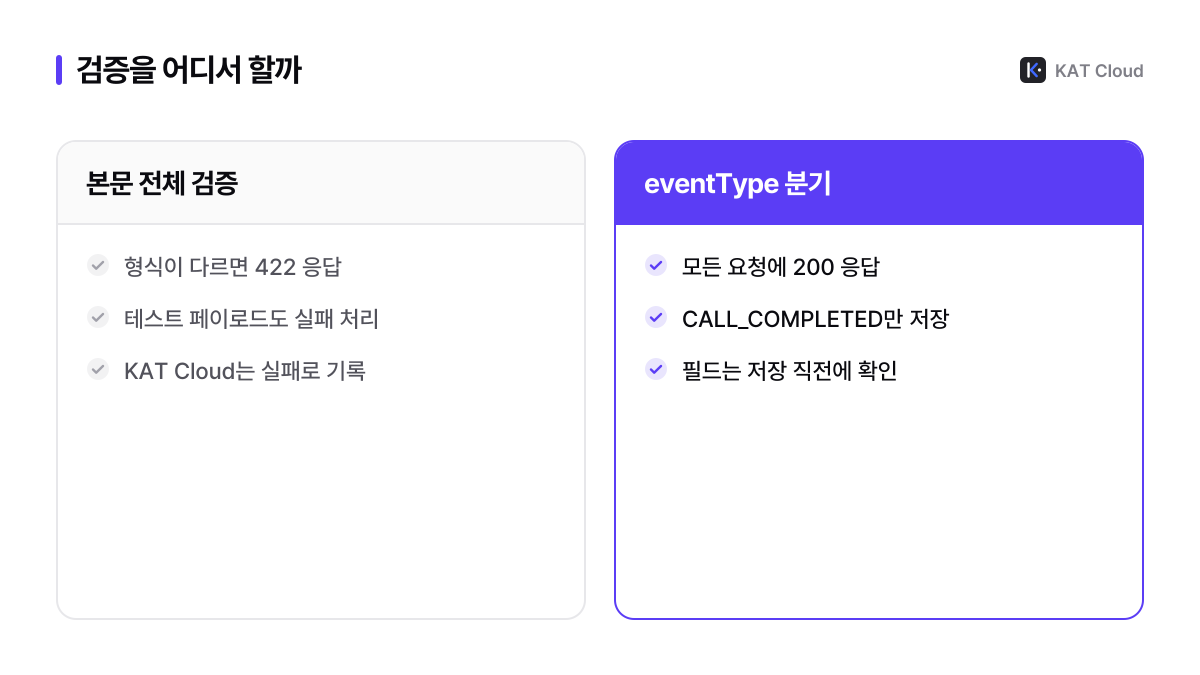
main.py에서는 요청 본문을 원본 JSON으로 읽고, eventType이 CALL_COMPLETED일 때만 저장 작업을 BackgroundTasks에 넘깁니다. FastAPI는 응답을 보낸 뒤 백그라운드 작업을 실행하므로, 저장이 늦어져도 KAT Cloud는 곧바로 200을 받습니다. KAT Cloud 웹훅은 타임아웃이 10초이고 HTTP 2xx를 성공으로 처리합니다.
# main.py
import logging
from contextlib import asynccontextmanager

from fastapi import BackgroundTasks, FastAPI, Request

from db import init_db, save_call

logger = logging.getLogger("katcloud-webhook")


@asynccontextmanager
async def lifespan(app: FastAPI):
    init_db()
    yield


app = FastAPI(lifespan=lifespan)


def store_call_completed(data: dict) -> None:
    try:
        save_call(data)
        logger.info("saved call %s", data.get("callHistoryId"))
    except Exception:
        logger.exception("failed to save call %s", data.get("callHistoryId"))


@app.post("/webhook/call-completed")
async def call_completed(request: Request, background: BackgroundTasks):
    try:
        body = await request.json()
    except ValueError:
        return {"received": False}  # JSON이 아니어도 200으로 끝낸다

    if not isinstance(body, dict) or body.get("eventType") != "CALL_COMPLETED":
        return {"received": True, "skipped": True}

    data = body.get("data") or {}
    if not data.get("callHistoryId"):
        return {"received": True, "skipped": True}

    background.add_task(store_call_completed, data)
    return {"received": True}
본문 전체를 Pydantic 모델로 받지 않은 데는 이유가 있습니다. 모델 검증이 실패하면 FastAPI가 422를 돌려주는데, KAT Cloud 입장에서는 2xx가 아니므로 실패한 전송이 됩니다. 테스트 페이로드나 필드가 일부 빠진 요청도 마찬가지입니다. 그래서 받는 단계에서는 최소한만 확인하고 항상 200을 돌려준 뒤, 필드 확인은 저장 직전에 합니다.
서버는 다음처럼 실행합니다.
pip install fastapi uvicorn
uvicorn main:app --host 0.0.0.0 --port 8000
3단계: 웹훅 등록과 테스트
먼저 로컬에서 예시 페이로드를 직접 보내 저장되는지 확인합니다. 같은 요청을 두 번 보내도 행이 하나만 있어야 정상입니다.
curl -s -X POST http://localhost:8000/webhook/call-completed \
  -H "Content-Type: application/json" \
  -d '{"eventType":"CALL_COMPLETED","timestamp":"2026-03-12T02:45:30.000Z","data":{"callHistoryId":"8f3f8fd9-7ab8-4a26-b523-4f8eb7d38b85","groupId":1,"channelId":100,"fromNumber":"01012345678","toNumber":"07012345678","isInbound":true,"status":"ANSWERED","tag":"AI_TO_DIRECT","duration":96,"summary":"예약 변경 요청을 접수함","sttAI":[],"sttDirect":[],"startedAt":"2026-03-12T02:40:00.000Z","completedAt":"2026-03-12T02:41:36.000Z"}}'

sqlite3 calls.db "SELECT call_history_id, tag, duration FROM calls;"
서버를 https 주소로 공개했다면 POST /webhook으로 등록합니다. 웹훅 URL은 https만 받으므로, 로컬 개발 중이라면 HTTPS 터널 도구로 임시 공개 주소를 만들어 씁니다. 등록이 끝나면 POST /webhook/{webhookId}/test로 KAT Cloud에서 내 서버까지 실제로 닿는지 확인합니다.
# register_webhook.py
import os

import requests

BASE_URL = "https://studio-gateway.zerocall.kr"
HEADERS = {"x-api-key": os.environ["KAT_API_KEY"], "Content-Type": "application/json"}

resp = requests.post(
    f"{BASE_URL}/webhook",
    headers=HEADERS,
    json={
        "eventType": "CALL_COMPLETED",
        "url": "https://hooks.example.com/webhook/call-completed",
    },
    timeout=10,
)
resp.raise_for_status()
webhook = resp.json()["result"]
print("webhook id:", webhook["id"])

test = requests.post(f"{BASE_URL}/webhook/{webhook['id']}/test", headers=HEADERS, timeout=30)
print(test.json()["result"])  # success, statusCode, responseTime, error
테스트 결과의 statusCode가 200이고 success가 true면 연결은 정상입니다. 테스트 페이로드의 내용은 문서에 정해져 있지 않으므로, 위 엔드포인트처럼 callHistoryId가 없는 요청도 200으로 넘기게 해 둡니다. 실패 원인을 좁혀 가는 방법은 웹훅 등록·수정·테스트 글을 참고합니다. 웹훅 관리 API는 비즈니스 요금제 그룹 또는 별도 허용된 그룹에서 쓸 수 있으며, 요청·응답 형식은 API 문서의 웹훅 항목에 있습니다.
저장한 통화 기록 활용하기
통화 기록이 쌓이면 SQL로 바로 집계할 수 있습니다. 예를 들어 응대 태그별 통화 수와 평균 통화 시간, AI에서 직원으로 넘어간 통화의 요약과 대화 내역은 다음처럼 뽑습니다.
# report.py
import json
import sqlite3

conn = sqlite3.connect("calls.db")
conn.row_factory = sqlite3.Row

# 태그별 통화 수와 평균 통화 시간(초)
for row in conn.execute(
    "SELECT tag, COUNT(*) AS calls, ROUND(AVG(duration)) AS avg_sec FROM calls GROUP BY tag"
):
    print(dict(row))

# AI에서 직원으로 넘어간 최근 통화 5건
for row in conn.execute(
    "SELECT call_history_id, summary, stt_ai, stt_direct FROM calls "
    "WHERE tag = 'AI_TO_DIRECT' ORDER BY started_at DESC LIMIT 5"
):
    print(row["call_history_id"], row["summary"])
    for turn in json.loads(row["stt_ai"]) + json.loads(row["stt_direct"]):
        print(f"  [{turn['role']}] {turn['text']}")
운영에서 함께 챙길 점은 다음과 같습니다.
- 녹음 파일:
recordingUrl은 오래 유효한 주소로 보지 않는 것이 안전합니다. 통화 기록 API의 녹음 URL은 1시간 뒤 만료되므로, 파일을 보관해야 하면 받은 즉시 내려받아 별도 저장소에 둡니다. - 누락 보정: 서버가 내려가 있던 동안의 통화는
GET /call-history에updatedAfter를 넣어 다시 가져올 수 있습니다. 같은call_history_id로 upsert하면 웹훅과 겹쳐도 문제가 없습니다. 자세한 방법은 통화 기록 증분 동기화 글에 있습니다. - 개인정보: 전화번호와 대화 내역이 담긴 DB 파일은 접근 권한을 좁히고, 보관 기간을 정해 오래된 행을 지웁니다.
- 다른 이벤트: 문자 수신이나 발송 결과까지 한 서버에서 받으려면 이벤트별 분기와 중복 키 설계가 필요합니다. Node.js 웹훅 수신 서버 글의 구조를 그대로 옮겨 쓸 수 있습니다.
자주 묻는 질문
CALL_COMPLETED 웹훅은 통화가 끝나자마자 오나요?
KAT Cloud의 CALL_COMPLETED는 통화가 끝난 직후가 아니라 STT와 요약 분석이 완료된 뒤에 전송됩니다. 그래서 웹훅을 받는 시점에는 summary와 sttAI, sttDirect가 함께 채워져 있습니다. 통화가 들어오는 순간을 알아야 한다면 CALL_RECEIVED 이벤트를 함께 등록합니다.
같은 통화가 두 번 저장되지 않게 하려면 어떻게 하나요?
callHistoryId를 테이블의 기본 키로 두고 INSERT ... ON CONFLICT(call_history_id) DO UPDATE로 저장하면, 같은 통화의 웹훅이 다시 와도 행은 하나만 남습니다. 이 방식은 웹훅과 통화 기록 API의 증분 조회를 함께 써서 같은 통화를 두 경로로 받는 경우에도 그대로 통합니다.
SQLite로 운영해도 괜찮나요?
SQLite는 서버 한 대에서 프로세스 하나가 쓰는 작은 규모라면 충분히 쓸 만하고, WAL 모드를 켜면 읽기와 쓰기가 덜 막힙니다. 인스턴스를 여러 대로 늘리거나 다른 서비스가 같은 데이터를 동시에 써야 한다면 PostgreSQL 같은 서버형 DB로 옮기고, 스키마와 upsert 구조는 그대로 가져가면 됩니다.
- #웹훅
- #Python
- #FastAPI
- #SQLite
- #CALL_COMPLETED